
如果上班,則等待下班
if、三元運算子與 &&
基本的判斷式,簡單啦。
今天一樣修改 welcome.tsx,就開始吧。
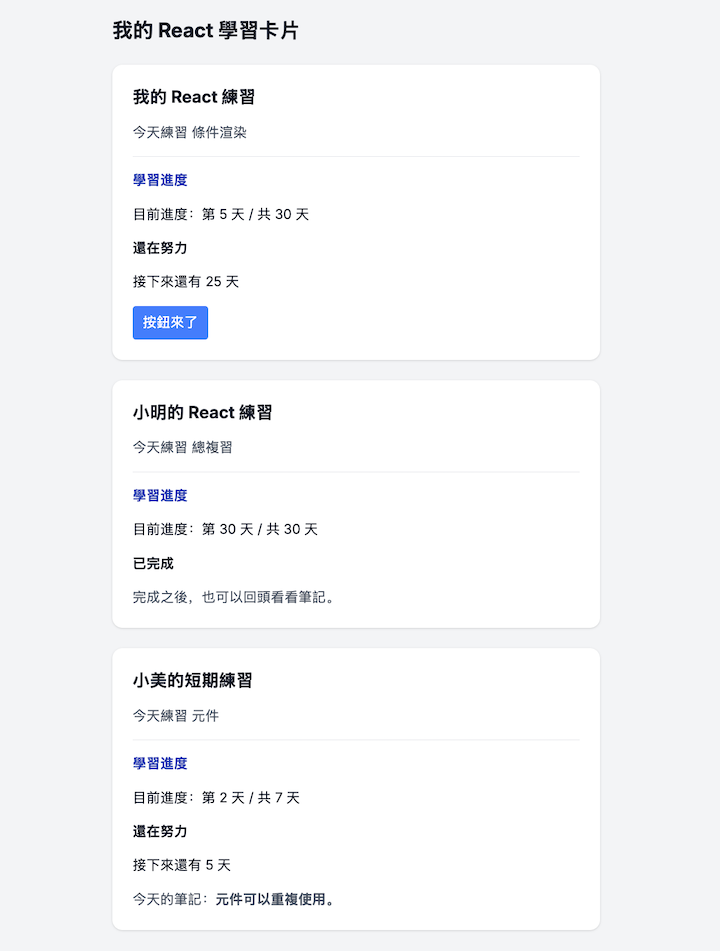
在 Welcome.tsx 裡面已經有學習卡片了,現在試著加入判斷,並顯示完成狀態。
預期要能顯示以下狀態:
| 條件 | 狀態 |
|---|---|
| 目前天數小於總天數 | 顯示「還在努力」,以及剩餘天數 |
| 目前天數大於或等於總天數 | 顯示「已完成」,不再顯示剩餘天數段落 |
| 目前沒有卡片資料 | 顯示「目前沒有學習資料,先安排一個主題吧。」 |
用法也容易理解,看範例:
const hasCards = true;

if (!hasCards) {
  return <p>目前沒有學習資料,先安排一個主題吧。</p>;
}
判斷現在是否有學習資料,若無,則回傳內容。
把這段放在 function Welcome() 裡,return 之前。
如果想要多一種判斷,可以再加上 else,例如:
const hasCards = true;

if (!hasCards) {
  return <p>目前沒有學習資料,先安排一個主題吧。</p>;
} else {
  return <p>放上想要的內容</p>
}
不過實際上使用的時候,我會把 !hasCards 的成立內容跟 else 對調,閱讀起來比較順,變成:
const hasCards = true;

if (hasCards) { // 對調之後,條件就相反了
  return <p>放上想要的內容</p>
} else {
  return <p>目前沒有學習資料,先安排一個主題吧。</p>;
}
修改 LearningCard 裡,根據收到的天數算出條件:
const isCompleted = day >= totalDays;

<p>{isCompleted ? "已完成" : "還在努力"}</p>
在 isCompleted 這行會比較數值,產生 true 或 false。
接著是三元運算子,可以這樣閱讀 條件 ? 成立時的內容 : 不成立時的內容。
之所以會這樣寫,是因為 JSX 的大括號 {},內容必須是運算式,使用 if...else,是放不進去的,可以使用 Arrow Function 處理,建立後立即呼叫就OK了。
範例示意:
<p>
  {(() => {
    if (isCompleted) {
      return "已完成";
    } else {
      return "還在努力";
    }
  })()} {/* 這裡的括號就是立即呼叫 */}
</p>
如果還有剩餘天數,把它放進畫面中。
const remainingDays = totalDays - day;

{remainingDays > 0 && <p>接下來還有 {remainingDays} 天</p>}
remainingDays > 0 會產生數值比較結果。成立的時候,會顯示接下來還有幾天,不成立則 React 不會顯示內容。React:Logical AND operator
| 寫法 | 本次用途 |
|---|---|
if 搭配 return |
沒有資料時,提早回傳另一個畫面 |
條件 ? A : B |
已完成、還在努力,選一種文字 |
布林條件 && JSX |
有剩餘天數才顯示提醒 |
下面是完整版,將 welcome.tsx 整個替換。
import type { ReactNode } from "react";

type LearningCardProps = {
  title: string;
  topic: string;
  day: number;
  totalDays?: number;
  children?: ReactNode;
};

export function Welcome() {
  const hasCards = true;

  if (!hasCards) {
    return (
      <main className="min-h-screen bg-gray-100 px-6 py-10 text-gray-900">
        <div className="mx-auto max-w-xl space-y-6">
          <h1 className="text-2xl font-bold">我的 React 學習卡片</h1>
          <p className="rounded-xl bg-white p-6 shadow">
            目前沒有學習資料,先安排一個主題吧。
          </p>
        </div>
      </main>
    );
  }

  return (
    <main className="min-h-screen bg-gray-100 px-6 py-10 text-gray-900">
      <div className="mx-auto max-w-xl space-y-6">
        <h1 className="text-2xl font-bold">我的 React 學習卡片</h1>

        <LearningCard title="我的 React 練習" topic="條件渲染" day={5}>
          <MyButton />
        </LearningCard>

        <LearningCard title="小明的 React 練習" topic="總複習" day={30}>
          <p className="text-gray-600">完成之後,也可以回頭看看筆記。</p>
        </LearningCard>

        <LearningCard
          title="小美的短期練習"
          topic="元件"
          day={2}
          totalDays={7}
        >
          <p className="text-gray-600">
            今天的筆記:<strong>元件可以重複使用。</strong>
          </p>
        </LearningCard>
      </div>
    </main>
  );
}

function LearningCard({
  title,
  topic,
  day,
  totalDays = 30,
  children,
}: LearningCardProps) {
  const remainingDays = totalDays - day;
  const isCompleted = day >= totalDays;

  return (
    <section className="space-y-4 rounded-xl bg-white p-6 shadow">
      <h2 className="text-xl font-bold">{title}</h2>
      <p className="text-gray-600">今天練習 {topic}</p>
      <hr className="border-gray-200" />
      <h3 className="font-bold text-blue-800">學習進度</h3>
      <p>
        目前進度:第 {day} 天 / 共 {totalDays} 天
      </p>
      <p className="font-bold">{isCompleted ? "已完成" : "還在努力"}</p>
      {remainingDays > 0 && <p>接下來還有 {remainingDays} 天</p>}
      {children}
    </section>
  );
}

function MyButton() {
  return (
    <button
      className="cursor-pointer rounded bg-blue-500 px-3 py-2 text-white hover:bg-blue-600"
      type="button"
    >
      按鈕來了
    </button>
  );
}
看範例:
{remainingDays && <p>接下來還有 {remainingDays} 天</p>}
分兩個原因:
&& 不一定回傳布林值。左邊是 0 時,運算會停下來並回傳這個 0。MDN:Logical AND
0。它和不顯示內容的 false、null、undefined 不同。React:Logical AND operator
修改成明確的比較運算式,讓左邊可以得到 true 或 false,或是改用三元運算子,明確寫出不顯示的內容。
三元運算子範例:
{remainingDays > 0 ? <p>接下來還有 {remainingDays} 天</p> : null}
判斷式很常用到,因為有一堆要求都會是,當遇到OO情況則顯示XX內容,所以使用上如果發生巢狀判斷式,官方的建議是抽取元件出來,避免過度雜亂。
明天我們再來看陣列、清單與 key,讓卡片不用一直複製貼上。



 iThome鐵人賽
 看影片追技術